> For the complete documentation index, see [llms.txt](https://docs.disasm.dev/llms.txt). Markdown versions of documentation pages are available by appending `.md` to page URLs; this page is available as [Markdown](https://docs.disasm.dev/datadome/interstitial.md).
# Interstitial
Solve the DataDome Interstitial ("Verifying your device") challenge.
The interstitial is DataDome's "Verifying your device" page. To clear it, you build a device-check URL from the block, fetch that page, and send it to our API. We return a payload that you submit back to DataDome in exchange for a `datadome` cookie.
Read the [Overview](/datadome/general-information.md) and [TLS & Fingerprinting](/getting-started/tls-fingerprinting.md) first - the session rules there apply throughout.
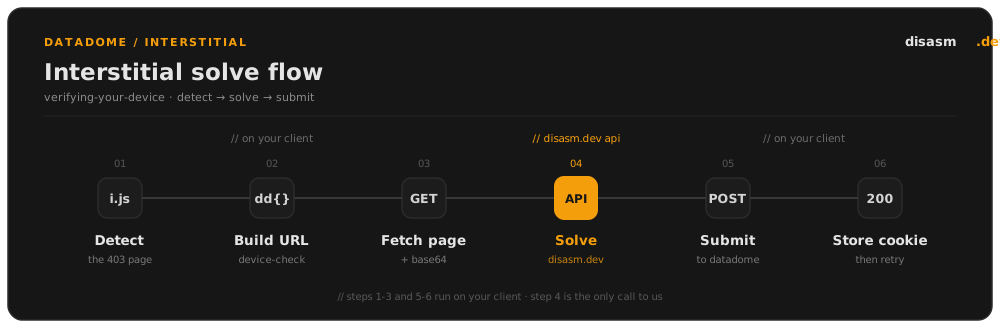
## The flow at a glance
1. **Detect** the interstitial block (a 403 referencing `i.js`).
2. **Build** the device-check URL from the block's `dd` object.
3. **Fetch** that URL and Base64-encode the page it returns.
4. **Solve** - send the URL and encoded page to our API and get a `payload` back.
5. **Submit** the payload to DataDome and get a `datadome` cookie.
6. **Retry** your original request with the cookie.
Steps 1-3 and 5-6 happen entirely on your side. Step 4 is the only call to us.
## Step 1 - Detect the block
A GET to a protected page returns a **403** whose body references `https://ct.captcha-delivery.com/i.js`. The challenge parameters arrive in one of two forms.
An inline `var dd = {...}` script:
```html
```
Or a JSON body that embeds the device-check URL directly:
```json
{"url":"https://geo.captcha-delivery.com/interstitial/?initialCid=...&hash=...&dm=cd"}
```
The helpers in the next step handle both.
## Step 2 - Build the device-check URL
If the block already contains a `{"url":"..."}`, use it as-is. Otherwise, parse the `dd` object and rebuild the URL from it, the current `datadome` cookie (empty on the first hit), and the page you were blocked on as the `referer`.
{% tabs %}
{% tab title="Go" %}
```go
import (
"encoding/json"
"errors"
"net/url"
"regexp"
"strconv"
"strings"
)
var ddRegex = regexp.MustCompile(`(?s)var dd\s*=\s*(\{.*?\})`)
// DD is the `var dd = {...}` object embedded in an interstitial block.
type DD struct {
Rt string `json:"rt"`
Cid string `json:"cid"`
Hsh string `json:"hsh"`
B int64 `json:"b"`
E string `json:"e"`
S int64 `json:"s"`
Host string `json:"host"`
}
// parseDD extracts the `var dd = {...}` object from a block page.
func parseDD(body []byte) (*DD, error) {
m := ddRegex.FindSubmatch(body)
if len(m) < 2 {
return nil, errors.New("no dd object found")
}
var dd DD
if err := json.Unmarshal([]byte(strings.ReplaceAll(string(m[1]), "'", `"`)), &dd); err != nil {
return nil, err
}
return &dd, nil
}
// deliveryURL returns the URL when the block uses the {"url":"..."} form, else "".
func deliveryURL(body []byte) string {
s := string(body)
const marker = `{"url":"https://geo.captcha-delivery.com/interstitial`
if !strings.Contains(s, marker) {
return ""
}
return strings.SplitN(strings.SplitN(s, `"url":"`, 2)[1], `"`, 2)[0]
}
// buildDeviceCheckLink builds the interstitial device-check URL. datadomeCookie
// is the current datadome cookie in your jar (empty on the first hit); referer
// is the page you were blocked on.
func buildDeviceCheckLink(body []byte, datadomeCookie, referer string) (string, error) {
if u := deliveryURL(body); u != "" {
return u, nil
}
dd, err := parseDD(body)
if err != nil {
return "", err
}
params := [][2]string{
{"initialCid", dd.Cid},
{"hash", dd.Hsh},
{"cid", datadomeCookie},
{"referer", referer},
{"s", strconv.FormatInt(dd.S, 10)},
{"e", dd.E},
{"b", strconv.FormatInt(dd.B, 10)},
{"dm", "cd"},
}
parts := make([]string, len(params))
for i, p := range params {
parts[i] = p[0] + "=" + url.QueryEscape(p[1])
}
return "https://geo.captcha-delivery.com/interstitial/?" + strings.Join(parts, "&"), nil
}
```
{% endtab %}
{% tab title="JavaScript" %}
```javascript
// Extract the `var dd = {...}` object from a block page.
function parseDD(body) {
const m = body.match(/var dd\s*=\s*(\{[\s\S]*?\})/);
if (!m) throw new Error("no dd object found");
return JSON.parse(m[1].replace(/'/g, '"'));
}
// Return the URL when the block uses the {"url":"..."} form, else "".
function deliveryUrl(body) {
const marker = '{"url":"https://geo.captcha-delivery.com/interstitial';
if (!body.includes(marker)) return "";
return body.split('"url":"')[1].split('"')[0];
}
// Build the interstitial device-check URL. datadomeCookie is the current
// datadome cookie in your jar (empty on the first hit); referer is the page
// you were blocked on.
function buildDeviceCheckLink(body, datadomeCookie, referer) {
const direct = deliveryUrl(body);
if (direct) return direct;
const dd = parseDD(body);
const params = [
["initialCid", dd.cid],
["hash", dd.hsh],
["cid", datadomeCookie],
["referer", referer],
["s", String(dd.s)],
["e", dd.e ?? ""],
["b", String(dd.b)],
["dm", "cd"],
];
const query = params
.map(([k, v]) => `${k}=${encodeURIComponent(v)}`)
.join("&");
return `https://geo.captcha-delivery.com/interstitial/?${query}`;
}
```
{% endtab %}
{% tab title="Python" %}
```python
import json
import re
from urllib.parse import quote
_DD_RE = re.compile(r"var dd\s*=\s*(\{.*?\})", re.DOTALL)
def parse_dd(body: str) -> dict:
"""Extract the `var dd = {...}` object from a block page."""
match = _DD_RE.search(body)
if not match:
raise ValueError("no dd object found")
return json.loads(match.group(1).replace("'", '"'))
def delivery_url(body: str) -> str:
"""Return the URL when the block uses the {"url":"..."} form, else ""."""
marker = '{"url":"https://geo.captcha-delivery.com/interstitial'
if marker not in body:
return ""
return body.split('"url":"', 1)[1].split('"', 1)[0]
def build_device_check_link(body: str, datadome_cookie: str, referer: str) -> str:
"""Build the interstitial device-check URL. datadome_cookie is the current
datadome cookie in your jar (empty on the first hit); referer is the page
you were blocked on."""
direct = delivery_url(body)
if direct:
return direct
dd = parse_dd(body)
params = [
("initialCid", dd["cid"]),
("hash", dd["hsh"]),
("cid", datadome_cookie),
("referer", referer),
("s", str(dd["s"])),
("e", dd.get("e", "")),
("b", str(dd["b"])),
("dm", "cd"),
]
query = "&".join(f"{k}={quote(str(v), safe='')}" for k, v in params)
return "https://geo.captcha-delivery.com/interstitial/?" + query
```
{% endtab %}
{% endtabs %}
The query values come from three places: `initialCid`, `hash`, `s`, `e` and `b` are read from the `dd` object; `cid` is your current `datadome` cookie; `referer` is the URL you were blocked on; and `dm` is always `cd`.
## Step 3 - Fetch and Base64-encode the device-check page
GET the device-check URL. A browser loads it in an iframe, so send it as a navigation request refered by the page you were blocked on. Base64-encode the full response body - that encoded string is the `device_check_page` for the next step.
## Step 4 - Get a payload from our API
POST the device-check URL and the encoded page to the [interstitial endpoint](/datadome/api-reference.md):
```json
{
"device_check_link": "https://geo.captcha-delivery.com/interstitial/?initialCid=...",
"device_check_page": "",
"language": "en-GB",
"user_agent": "Mozilla/5.0 (Windows NT 10.0; Win64; x64) AppleWebKit/537.36 (KHTML, like Gecko) Chrome/126.0.0.0 Safari/537.36",
"ip_address": ""
}
```
| Field | Description |
| ------------------- | ----------------------------------------------------------- |
| `device_check_link` | The device-check URL from step 2. |
| `device_check_page` | Base64 of the device-check page from step 3. |
| `language` | The first tag of your `Accept-Language` header (see below). |
| `user_agent` | The User-Agent you use for the whole session. |
| `ip_address` | Your proxy's egress IP. Sets the payload's timezone. |
The response gives you the `payload` to submit next, plus a `headers` map of client hints to send on your requests.
### Accept-Language matters
The `language` you send is the first tag of your `Accept-Language` header (for example `en-GB`), and it is not cosmetic. We embed it in the payload, and DataDome later checks it against your live requests, so it has to line up everywhere.
* **Keep it consistent for the whole session.** Send the same `Accept-Language` on every request: the original block, the device-check fetch, the value you pass here, and every request afterwards. A value that changes mid-session is a clear signal.
* **Match it to your IP.** The language should be plausible for the proxy's location. Use the [get-ip endpoint](/datadome/api-reference.md) to confirm the IP and timezone we resolve for your proxy, then choose a language consistent with it.
* **It is baked into the payload.** Because the `language` you pass is embedded in the solved payload, DataDome compares it against the `Accept-Language` on your later requests. If they differ, the cookie is rejected, so the value here must match the header you actually send.
## Step 5 - Submit the payload to DataDome
POST the `payload` to `https://geo.captcha-delivery.com/interstitial/` over **HTTP/1.1**, with headers that match real Chrome. Submit the body exactly as returned (`application/x-www-form-urlencoded`, unchanged):
```http
POST /interstitial/ HTTP/1.1
Host: geo.captcha-delivery.com
sec-ch-ua-platform: "Windows"
user-agent: Mozilla/5.0 (Windows NT 10.0; Win64; x64) AppleWebKit/537.36 (KHTML, like Gecko) Chrome/126.0.0.0 Safari/537.36
sec-ch-ua: "Not/A)Brand";v="8", "Chromium";v="126", "Google Chrome";v="126"
content-type: application/x-www-form-urlencoded; charset=UTF-8
sec-ch-ua-mobile: ?0
accept: */*
origin: https://geo.captcha-delivery.com
sec-fetch-site: same-origin
sec-fetch-mode: cors
sec-fetch-dest: empty
sec-fetch-storage-access: none
referer:
accept-encoding: gzip, deflate, br, zstd
accept-language: en-GB,en;q=0.9
```
A success returns:
```json
{
"cookie": "datadome=...; Max-Age=31536000; Domain=.thefork.it; Path=/; Secure; SameSite=Lax",
"view": "redirect",
"url": "https://www.thefork.it/"
}
```
## Step 6 - Store the cookie and retry
Take the `datadome` cookie from `cookie` and store it for the target domain, replacing any existing one. Then:
* if `view` is `redirect`, navigate to `url`;
* otherwise, retry your original request.
You should now reach the page.
### If `view` is `captcha`
A `view` of `captcha` means the interstitial was not accepted - DataDome has escalated to a CAPTCHA, which is a sign something about your request was off. Check these first:
* **DataDome has changed.** We update the solver automatically, so there is usually nothing for you to do - wait a moment and retry.
* **`Accept-Language` is wrong** or inconsistent with the value you sent in step 4.
* **Your TLS fingerprint is wrong.** It must match real Chrome - see [TLS & Fingerprinting](/getting-started/tls-fingerprinting.md).
* **Header order is wrong.**
* **Missing or bad headers**, such as a `Referer` that doesn't match your navigation.
Once the underlying issue is fixed, restart from step 1. If you do need to solve the CAPTCHA itself, follow the [Slider CAPTCHA](/datadome/slider-captcha.md) guide.